
Turn varied supplier data into controlled Shopify catalogue updates.
PowerFeed helps Shopify merchants import, clean, validate, and update supplier product data from varied supplier formats, without fragile spreadsheets, risky bulk edits, or blind automation.
Designed exclusively for Shopify, so every workflow, field, and log is built around Shopify products, variants, inventory, and merchant operations.
The problem
Outdated supplier data creates real retail problems.
Stock availability, pricing, product ranges, and supplier files change constantly. Without a controlled way to standardise and update that data, Shopify merchants risk overselling, lost margin, stale catalogues, and hours of manual spreadsheet work.
Retail pain
Stock availability changes quickly
Selling an out-of-stock item immediately creates a poor customer experience. PowerFeed helps keep Shopify stock updates aligned with the latest supplier availability.
Supplier prices and RRPs move
If your catalogue is still using old supplier pricing, you can lose margin, publish the wrong RRP, or miss pricing changes that should have been reflected sooner.
New products are easy to miss
Suppliers release new ranges, colours, sizes, and variants. Without a repeatable feed process, those products may never make it into Shopify, or they arrive late.
Manual catalogue updates do not scale
Spreadsheets, copy-and-paste updates, and bulk edits become risky as your supplier count, SKU count, and update frequency grow.
Operational issues
Every supplier structures data differently
CSV files, spreadsheets, FTP folders, and supplier feeds often use different field names, formats, and rules. PowerFeed gives merchants a consistent way to map supplier data into Shopify.
Bulk updates need control
A product feed should not blindly overwrite your catalogue. PowerFeed gives merchants source settings, mappings, transformations, guardrails, and logs.
Shopify detail matters
Shopify products, variants, inventory, handles, images, metafields, and status rules need workflows designed around how Shopify actually works.
You need to know what happened
When a run completes, merchants need to see what changed, what failed, what was skipped, and what needs attention.
PowerFeed capabilities
Built to make supplier updates controlled, repeatable, and explainable.
PowerFeed gives merchants a structured operating layer between supplier data and Shopify, so updates are configured once and reused safely.
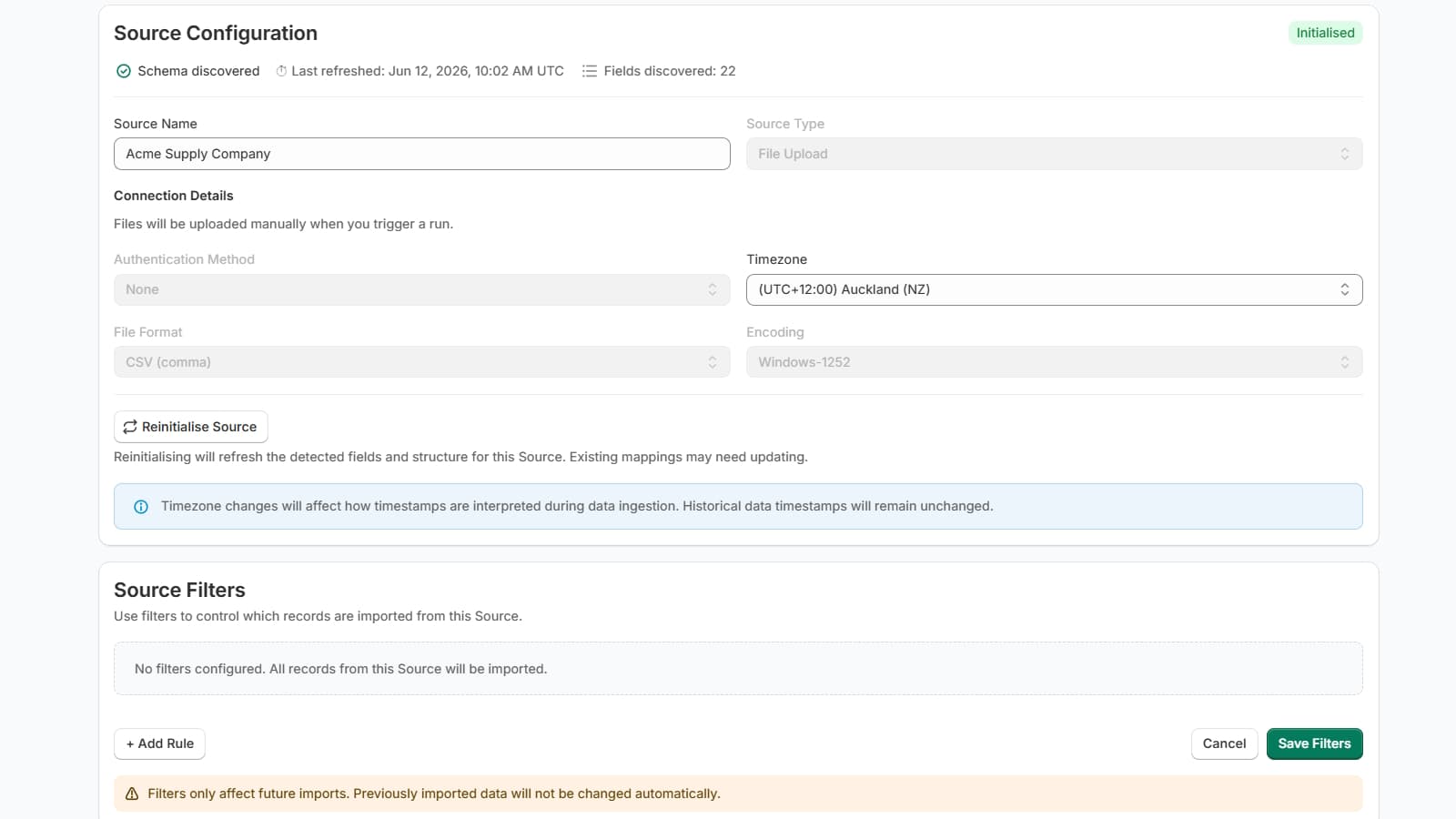
Visual source configuration
Connect supplier files and define exactly how each source should behave before it updates your Shopify catalogue.
Field mapping built around Shopify
Map supplier columns to Shopify products, variants, prices, inventory, images, metafields, and operational fields.
Transform data before import
Clean, normalise, adjust, and reshape supplier data before it reaches your store.
Guardrails for safer updates
Control what PowerFeed is allowed to create, update, archive, skip, or protect during each run.
Run history and logs
Review what happened after each run, including outcomes, issues, skipped rows, and operational detail.
Designed for variants
Built for Shopify product and variant structures, not generic spreadsheet imports.
How it works
From supplier file to repeatable Shopify update.
PowerFeed is not a blind importer. It helps you configure the rules, mappings, transformations, and safeguards that control how supplier data flows into Shopify.
Connect a supplier source
Upload a file, connect to a supplier-hosted feed, or use an FTP/SFTP location.
Map fields to Shopify
Tell PowerFeed how supplier columns relate to your Shopify catalogue structure.
Transform and clean the data
Apply formatting, normalisation, pricing logic, text cleanup, and controlled data rules.
Set guardrails
Define what can change, what should be skipped, and how risky supplier updates should be handled.
Run repeatable updates
Use the same controlled configuration each time instead of rebuilding spreadsheets manually.
Review logs
See what changed, what failed, what was skipped, and what needs attention.
Product visibility
Configure the source, protect the catalogue, review the outcome.
PowerFeed gives product teams practical control over supplier product data, from source configuration through to run logs.
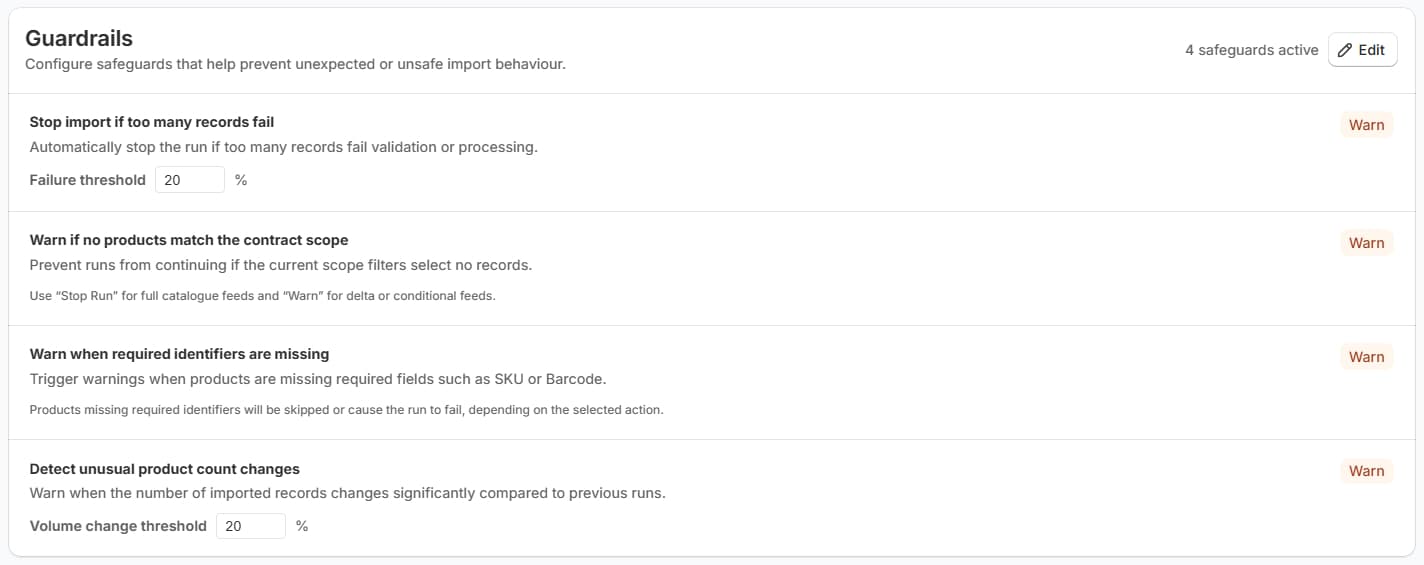
Guardrails
Set boundaries for how supplier updates should affect your Shopify catalogue.
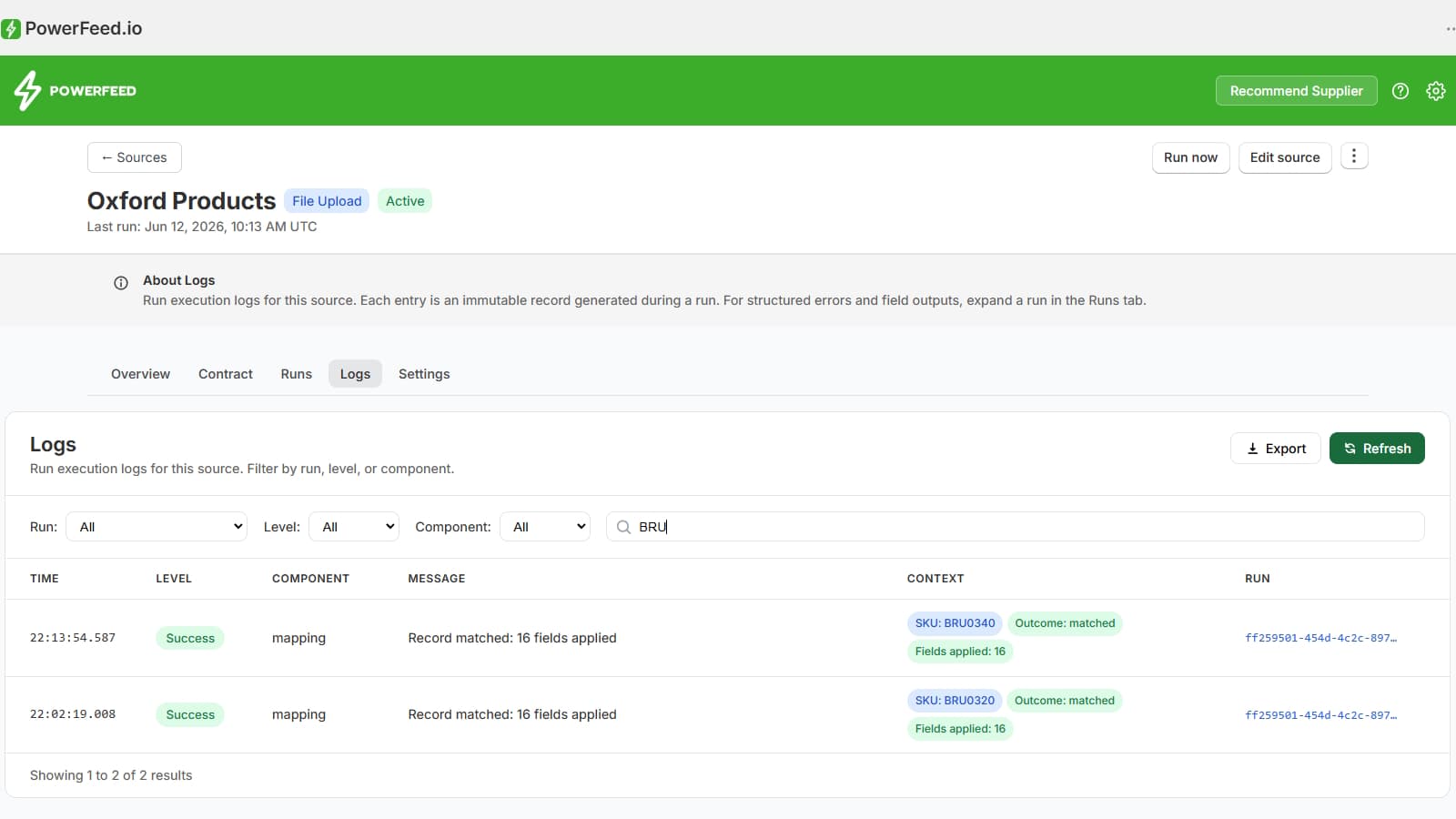
Run logs
Review run outcomes, issues, skipped records, and operational history.
Product demo
See PowerFeed in action.
Watch how PowerFeed helps merchants configure a supplier source, map fields, apply guardrails, run updates, and review what happened through clear run logs.
Shopify-first trust
Built for catalogue operations that need control.
PowerFeed is designed around Shopify merchant operations: product data, variant data, inventory updates, source settings, run logs, and repeatable configuration.
Shopify authorised app
Connects through Shopify app permissions and operates inside configured merchant workflows.
No blind generic imports
Source behaviour is configured before runs are used for live catalogue updates.
Logs and history
Run outcomes are recorded so merchants can understand what happened after each update.
Merchant-controlled setup
Merchants remain in control of source data, mappings, transformations, and guardrails.
Use cases
Made for merchants managing supplier-driven catalogues.
PowerFeed is especially useful for Shopify stores with large catalogues, frequent supplier updates, multi-brand ranges, or product data that changes often.
Replace manual supplier CSV imports
Keep supplier inventory more current
Import new supplier products safely
Standardise varied supplier data
Manage large variant catalogues
Prepare for multi-supplier operations
Pricing
Start free, then scale with your product data.
PowerFeed pricing is based on the product feed volume, update frequency, and operational needs of your Shopify store. Billing is handled securely through Shopify.
Free plan
Test PowerFeed safely with a small catalogue and manual runs.
Core plans
For small to medium merchants running regular supplier imports.
Scaling plans
For growing businesses with more suppliers, variants, and scheduled runs.
Enterprise plans
For complex operations, larger catalogues, agencies, and custom onboarding.
Ready to replace risky spreadsheet imports?
Build controlled, repeatable, auditable supplier product feed workflows for Shopify.