
The short answer
How can Shopify products update automatically?
Use a repeatable supplier source, reliable product and variant matching, field-specific rules and a scheduled import process. That allows the information the supplier owns—such as availability or approved selling prices—to be refreshed without automatically replacing every other part of a product listing. The best process usually separates new-product creation from routine stock and price updates, with a small test before changes go live.
POWERFEED IN PRACTICE
Update what changes. Keep what you've improved.
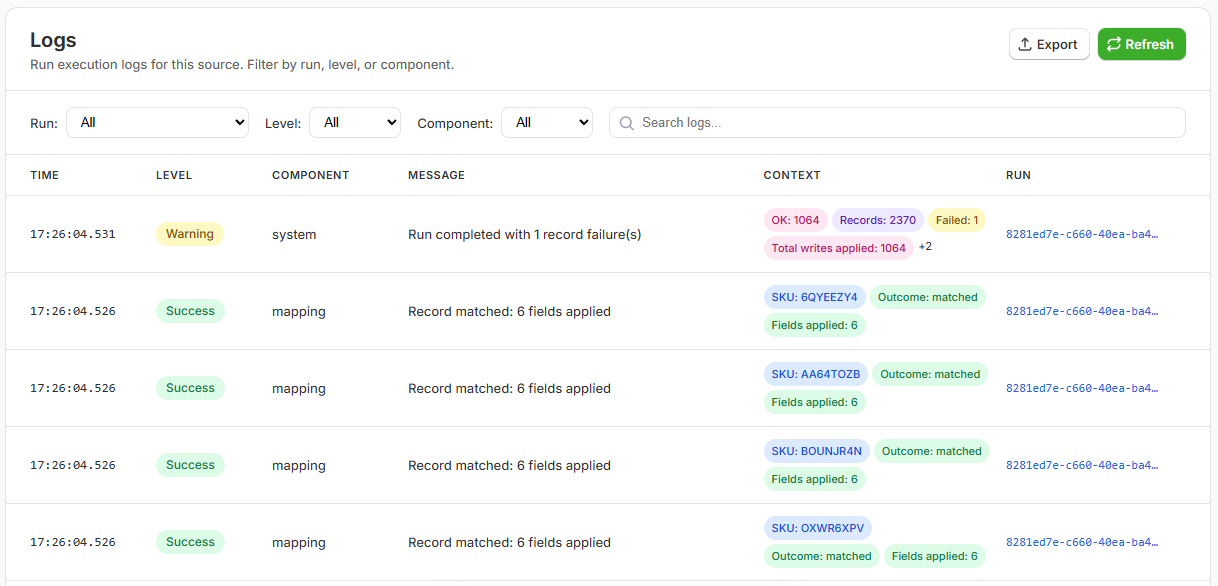
Refresh supplier-owned information such as stock and pricing without automatically replacing the descriptions, images and merchandising you've worked on. PowerFeed uses field-specific rules and repeatable runs so updates stay focused on the information you choose.
- Specify what each source may update
- Review changes, skips and errors after each run
Practical guide
Start with the fields that genuinely need updating
- Identify recurring changes. Supplier stock may change daily while descriptions and images change only when ranges launch. Different fields don't always need the same schedule.
- Choose the product identifier. Match variants consistently using the correct SKU or configured identifier, not a title that might be shared or changed.
- Define price rules carefully. Know whether the supplier file contains cost, wholesale price, recommended retail or already-calculated selling price. Handle currency, tax and any supported transformation rules correctly.
- Protect merchant-managed fields. Your own product descriptions, SEO copy, collections and merchandising may need to remain untouched while price or inventory updates.
- Test exceptions, then monitor. Check zeros, blanks, unexpected price movements, discontinued products and skipped matches; read the run results.
Worked example
Different fields, different ownership
| Field | Supplier may own it? | Example policy |
|---|---|---|
| Supplier stock | Often | Update on a suitable stock-feed schedule |
| Supplier price/cost | Often | Update using verified pricing rules |
| Product title | Sometimes | Update only where the supplier is the trusted source |
| Store-written description | Often no | Preserve existing Shopify copy |
| Merchandising tags | Usually merchant-specific | Leave untouched unless intentionally mapped |
Illustrative update policy: decide field ownership before enabling recurring changes.
What to watch for
Risks to consider before scheduling product updates
Automatically replacing a carefully edited description with a basic supplier description can reduce the quality of your catalogue. Treat unexpected zero prices cautiously: a zero may indicate missing data rather than a valid selling price. Stock accuracy also depends on the supplier's update frequency and the meaning of its quantity fields. Decide which fields to update, test the source with representative data and establish a process for correcting unwanted changes.
Where PowerFeed fits
Controlled updates, not blind replacement
PowerFeed gives each supplier source defined mappings, transformations, product/variant identification, source contracts and run guardrails. Configure the fields to manage, set the appropriate schedule and inspect logs after each run. This is especially useful when the supplier sends recurring changes in a non-Shopify format or when a store contains substantial merchant-curated product information.
Questions about automatic product updates
- Can I automate prices without replacing product descriptions?
- Yes. Configure the source to update the required price fields and exclude descriptions from its permitted updates. Test with a representative sample before scheduling the full feed.
- What if a supplier price is zero?
- Don't assume it is a valid selling price. Establish the supplier's meaning for zero/missing values and review/update rules before publishing products with unexpected prices.
- Do updates need to run every hour?
- No. Choose a frequency based on supplier refresh timing, business needs and plan limits.