
The short answer
What is supplier feed mapping?
Field mapping defines where each supplier value belongs in Shopify. A transformation changes the value before it is written, such as trimming spaces, extracting a brand from a combined field or applying a verified pricing calculation. Product grouping, stable identifiers and variant options also need to be configured correctly. The aim is to create a mapping that can be tested and reused when new supplier files arrive.
POWERFEED IN PRACTICE
Map supplier fields to the correct Shopify data.
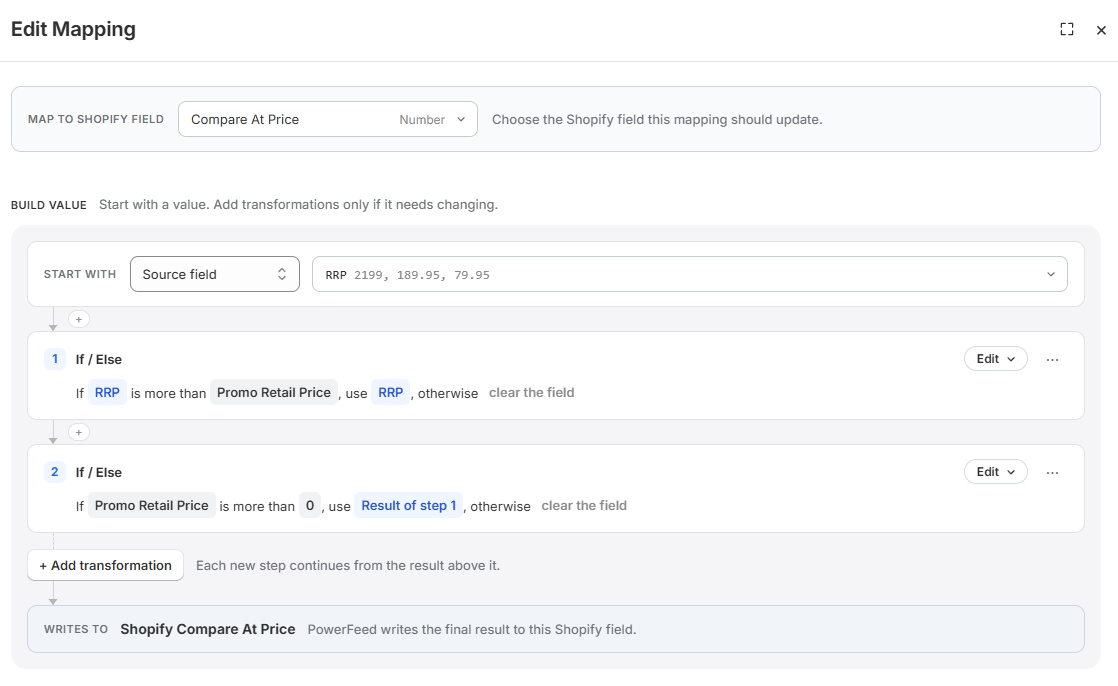
Supplier SKUs, option values and price fields rarely arrive in the same format. PowerFeed lets you map them to Shopify fields and apply supported transformations, then reuse those rules when the supplier sends more data.
- Keep product and variant mappings explicit
- Reuse tested transformations on future runs
Practical guide
How to map a supplier catalogue
- Define the unit of a row. Check whether a source row represents a product, SKU, colour, size or other variant, and which records belong together.
- Choose matching fields. Distinguish supplier IDs, SKUs and barcodes; verify uniqueness and whether the same identifier appears in multiple suppliers.
- Map fields deliberately. Connect title, vendor, type, price, inventory, description, images and options to their intended Shopify destinations.
- Transform only where necessary. Normalise text, split combined fields, apply supported calculations or clean stray formatting. Keep business rules documented and understandable.
- Test edge cases. Include blank fields, duplicate identifiers, multiple images, unusual prices and a product with several variants. Verify the output rather than assuming it is correct.
Worked example
Turning one supplier column into two useful fields
| Incoming supplier value | Shopify destination | Intended result |
|---|---|---|
100% - Goggles | Vendor | 100% |
100% - Goggles | Product type | Goggles |
Shimano | Vendor | Shimano |
Supplier size M / colour Black | Variant options | Appropriate Size/Colour option values |
Splitting a combined value requires two mappings, each extracting the relevant part. A regex or equivalent supported transformation may be appropriate; confirm the functions available in the live editor.
Illustrative sample data
- Supplier source value
- 100% - Goggles
- One combined brand and category field.
- Mapping 1 · Vendor
- 100%
- Extract the brand before the separator.
- Mapping 2 · Product type
- Goggles
- Extract the category after the separator.
What to watch for
Where mapping decisions go wrong
SKU collisions, prices with mixed currencies and variant grouping mistakes can cause wider issues than text formatting. A supplier title isn't always a reliable unique match. If the feed changes column names or shapes, revisit the mapping and re-test. Most importantly, transformations should be understandable to the next person who supports the store—complexity for its own sake isn't an advantage.
Where PowerFeed fits
Reusable field mappings and transformations
PowerFeed's field mappings and supported transformations convert supplier-specific values into the Shopify fields you choose. Configure product matching, field updates and source behaviour, then reuse the setup for subsequent imports. The data contract defines how the source can update Shopify, while run logs show how each import was processed.
Questions about supplier field mapping
- Do supplier column headings have to match Shopify fields?
- No. A mapping workflow can translate source columns to the appropriate destination fields, subject to feed compatibility.
- How should variants be handled?
- Determine which supplier rows belong to one product, then map options and identifiers consistently. Always test products with multiple variants.
- Can I preserve my own product descriptions?
- Yes, by restricting which fields the supplier source is permitted to update. Confirm the exact behaviour with a test run.