
The short answer
How do you import supplier CSV files into Shopify?
Shopify includes a native product CSV import for one-off catalogue changes. However, supplier spreadsheets often use different column names, product groupings, price calculations and image references. For an occasional import, you can convert the file into Shopify's required structure and upload it manually. For recurring supplier files, a mapped import is usually more practical: configure the fields and matching rules once, test the results and reuse the configuration.
POWERFEED IN PRACTICE
Turn recurring supplier CSVs into one repeatable setup.
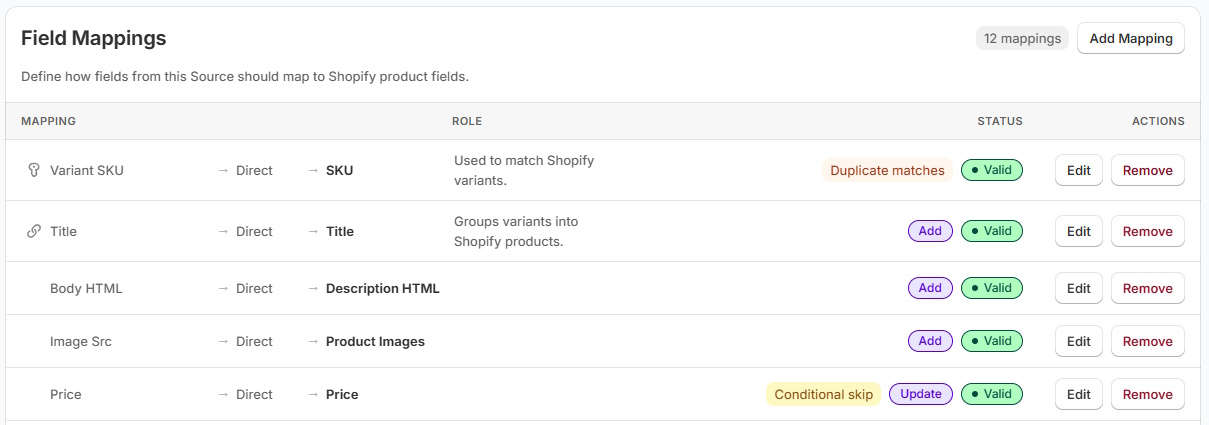
Your supplier's columns don't have to match Shopify's. Map the file once in PowerFeed, choose what can change and reuse the setup when the next CSV arrives. You'll spend less time reshaping spreadsheets and more time checking the results.
- Map supplier fields to products and variants
- Test and review updates before scaling up
Practical guide
A safer way to work with supplier CSV files
- Inspect a real sample. Check whether each row represents a product or a variant. Identify SKU, barcode, supplier code, stock, price, brand, options, descriptions and image references. Look for duplicate identifiers and blank columns.
- Decide what the file should change. A new-product import and a stock-only update are different jobs. Document which fields should be created, updated or left alone.
- Map identifiers before content. Match the supplier SKU or another reliable identifier to the correct Shopify product/variant. Handle sizes, colours or other options as variants rather than accidentally creating separate products.
- Test with a small selection. Check prices, image placement, options, unexpected blank values and existing product matches. Review the result before applying the full catalogue.
- Automate only if the feed repeats. If the supplier sends a revised file every day or week, use a persistent mapping and a suitable scheduled update, then review exceptions rather than cleaning the whole spreadsheet again.
Worked example
What needs mapping?
| Supplier column | Intended Shopify destination | What to check |
|---|---|---|
supplier_sku | Variant identifier / SKU | Consistent, unique matching |
brand | Vendor | Brand spelling and formatting |
product_name | Product title | Repeated rows and variant grouping |
qty_available | Inventory | Source of truth and update timing |
selling_price | Price | Currency and retail pricing rules |
image_url | Product imagery | Working URLs and multiple images |
Illustrative supplier fields; not a Shopify CSV template. Verify identifiers and variant grouping before mapping the rest of the file.
Illustrative sample data
- supplier_sku
- BIKE-100-M
- Match the variant, then apply its fields.
- product_name
- Trail Glove
- Title belongs to the parent product.
- qty_available
- 8
- Confirm stock meaning and location.
What to watch for
Three common CSV import mistakes
- Overwriting existing content. With Shopify's native product CSV import, the matching-handle overwrite option can replace fields from the file; blank supplied fields may clear existing values. A missing column and a present-but-empty column are not necessarily the same thing.
- Treating variants as separate products. A row for each colour or size needs a coherent product/variant structure. Don't match on a non-unique title alone.
- Confusing product imports with inventory imports. Shopify offers a separate native inventory CSV workflow. Choose the correct mechanism for the job.
Read Shopify’s product CSV import and overwrite guidance and its separate inventory CSV workflow before importing.
Where PowerFeed fits
Make recurring CSV imports repeatable
PowerFeed is intended for recurring supplier imports or files that do not match Shopify's CSV format. Configure a source, map its fields and define which products and fields it may create or update. Test with a sample, review the run results and schedule subsequent imports within your plan limits. For a straightforward one-off change, Shopify's native CSV importer may be sufficient.
Questions about csv product imports
- Can I import a CSV into Shopify without an app?
- Yes. Shopify's product CSV importer is designed for manual imports using Shopify's expected format. Supplier-specific column layouts may need preparation first.
- Can a supplier CSV update existing products instead of creating duplicates?
- Yes, provided the import workflow uses reliable product or variant matching and you understand which fields may be replaced. Test matching with a small sample.
- What if my supplier sends a new CSV every morning?
- A repeatable mapped feed with scheduled runs is generally more maintainable than converting and uploading the entire file each day. Available run frequency depends on your plan.