The short answer
How can I import only some products from a supplier feed?
Define an explicit selection scope before creating or updating Shopify listings. Depending on the available source fields, that might mean selecting reliable categories, brands, SKUs, ranges or other supplier attributes. Keep the selection rules separate from the field mappings where possible: first decide which records are eligible, then decide how their fields map. Test that changes to the supplier catalogue don't silently pull unwanted products into your store.
POWERFEED IN PRACTICE
Import the products you want to sell.
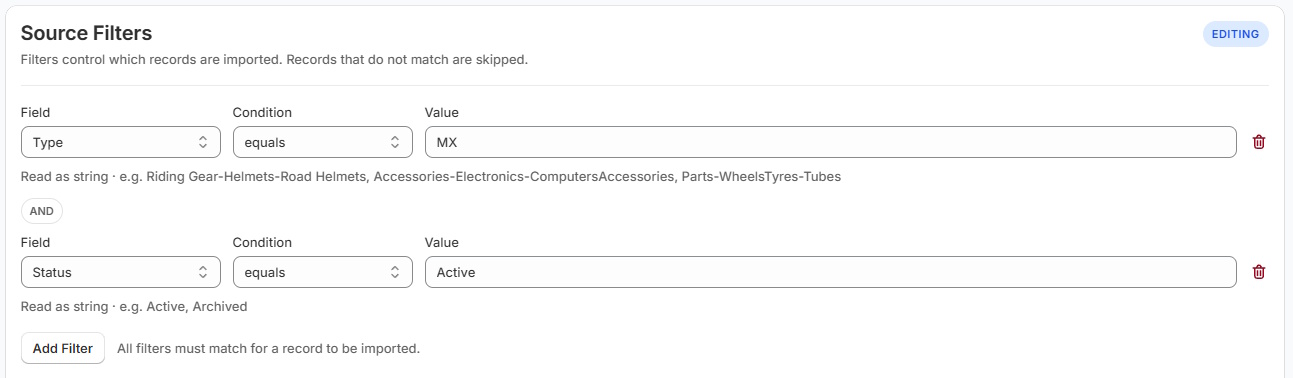
A supplier catalogue may contain thousands of products outside your range. Where the source configuration supports it, PowerFeed can limit the records included in an import, helping you avoid adding unwanted products to your Shopify catalogue.
- Work from explicit source selection rules
- Test eligibility before a full import
Practical guide
How to define supplier product selection rules
- Start with the merchandising decision. Which brands, categories or SKUs fit your store, audience and stock strategy? Don't let the supplier export make that choice for you.
- Confirm stable filter values. Supplier categories may be renamed, brand spelling can vary and blank classifications may occur. Check a representative sample.
- Define what happens to excluded items. Not creating a product is different from unpublishing, archiving or deleting something that already exists. Set explicit behaviour for each situation.
- Respect product and variant groupings. Selecting one size or colour must not accidentally create a broken parent product or remove other variants.
- Test and audit the result. Compare intended included/excluded records with the actual import preview or run result, and monitor when the supplier adds new ranges.
Worked example
Choose a range, not the entire catalogue
| Example supplier record | Store decision | Reason |
|---|---|---|
| Cycling brand, accessories category | Include | Fits this store's offer |
| Children's apparel category | Exclude | Outside chosen product range |
| Selected SKU list for a seasonal collection | Include selected SKUs | Merchandising has approved a subset |
| New unclassified supplier product | Review | Classification doesn't yet support an automatic decision |
This is a conceptual selection policy. Available controls depend on source configuration and data-contract scope; confirm them against your supplier sample.
Illustrative sample data
- Chosen accessories
- Include
- The range fits the merchandising policy.
- Unwanted category
- Exclude
- Out of scope does not mean delete.
- Unclassified new SKU
- Review
- Confirm eligibility before adding it.
What to watch for
Selection mistakes to avoid
A product that temporarily disappears from a supplier feed is not necessarily discontinued. Excluding a record from an import also does not automatically mean it should be unpublished. Avoid selection rules based on unstable product titles, and check how new variants are grouped with existing products. Make sure one supplier's rules cannot unintentionally overwrite products maintained through another source.
Where PowerFeed fits
Decide what's in scope before it changes your store
PowerFeed uses source configuration and data-contract scope to define how supplier imports are processed. Confirm which record-selection rules are available for your source, then test them against a representative sample. Selecting which products to import and choosing which fields can change are separate decisions.
Questions about selective product imports
- Do I have to import every product in a supplier feed?
- Not always. Source-level filters or selection rules may allow you to limit the imported products. Available controls depend on your configuration and should be confirmed with a test run.
- Will excluding a record delete it from Shopify?
- Excluding, not creating, unpublishing, archiving and deleting are different actions. Never assume one follows from another without an explicit update policy.
- What happens when the supplier adds new SKUs?
- Re-evaluate them against the current inclusion rules. Items that don't meet the policy should not be automatically added just because they appear in the latest file.