
The short answer
How do you manage several supplier feeds in Shopify?
Treat each supplier as a distinct data source with its own connection method, identifiers, mapping rules and update schedule. Decide whether two suppliers can affect the same Shopify product and what the intended source of truth is for inventory and price. Standardise the resulting catalogue without assuming the source files are standard. A source-per-supplier approach makes failures and changes easier to isolate and investigate.
POWERFEED IN PRACTICE
Keep multiple supplier feeds organised.
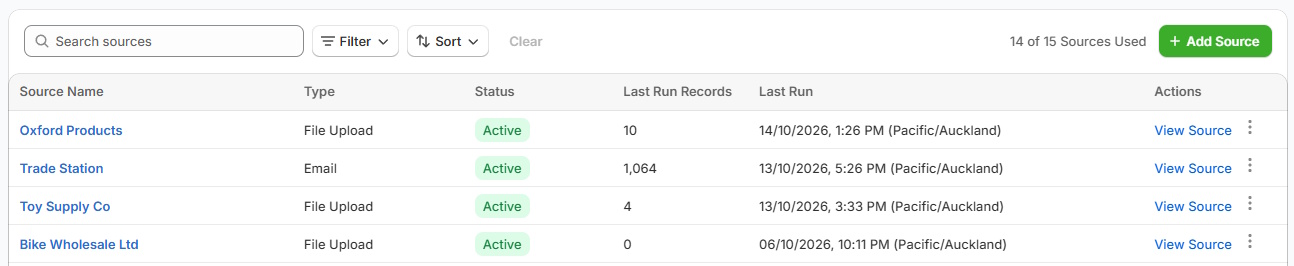
Each supplier may have a different format, mapping and update schedule. PowerFeed keeps their configurations and run histories separate, so you can review changes and investigate errors by source.
- Give each source its own settings
- Keep run histories separate and visible
Practical guide
Define matching and field ownership for each supplier
- Document each supplier's feed. Note format, location, refresh timing, identifiers, contact and whether it provides a full catalogue or stock-only data.
- Set unique matching rules. One supplier's SKU might collide with another's. Establish how products/variants are recognised before imports start.
- Define field ownership. Decide which supplier or merchant owns stock, price, brand, description, image and merchandising values on shared products.
- Separate schedules and exceptions. An API stock feed may need a different cadence from a weekly catalogue CSV. Review failed sources independently.
- Respect capacity and plan limits. The number of supported source configurations, variants and scheduled runs depends on your plan; don't assume unlimited capacity.
Worked example
Multiple suppliers, one catalogue
| Source | Data format | Potential challenge |
|---|---|---|
| Cycle Distributor A | Daily CSV | Supplier item code differs from Shopify SKU |
| Motorcycle Distributor B | Hosted XML | Nested sizes and colour variants |
| Outdoor Supplier C | SFTP stock file | Stock refreshes without full product descriptions |
These suppliers are fictional examples, not claimed integrations. Supplier A and Supplier B could both use SKU-123 for completely different items: source context and matching rules matter.
Illustrative sample data
- Supplier A · SKU-123
- Trail glove
- Its own source context and matching rules.
- Supplier B · SKU-123
- Water bottle
- A different item using the same code.
- Matching decision
- Keep distinct
- Test identifiers across suppliers before updating.
What to watch for
What grows more complicated as suppliers increase
Overlapping records, product duplication, conflicting prices, inconsistent brand naming, supplier failures and maintenance ownership. A reliable process should make it easy to answer: Which source last attempted to update this product, and under which rules? Keep your own editorial fields out of uncontrolled supplier updates.
Where PowerFeed fits
A configured workflow for each source
PowerFeed manages separate source configurations with field mappings, contracts, permitted updates, schedules and logs. This helps make varied supplier data more manageable while keeping source-specific logic understandable. It doesn't automatically resolve every cross-supplier ownership conflict; those rules need to be decided and tested. See Pricing for source and scheduled-run limits.
Questions about multiple supplier feeds
- Can suppliers use different file formats?
- Yes. PowerFeed can manage multiple source formats and connection methods, subject to individual feed compatibility and plan limits. Each supplier should have its own configuration.
- What happens when two suppliers use the same SKU?
- Never assume the SKU alone is globally unique. Define matching and ownership rules and test collisions before letting both sources update the catalogue.
- Is there a limit to the number of suppliers?
- PowerFeed plans include source limits. Refer to current Pricing rather than relying on a fixed figure on this page.