
The short answer
Can Shopify import a supplier XML feed?
Shopify's standard product import expects its supported CSV structure, not an arbitrary supplier XML document. An XML supplier feed therefore needs to be parsed into product and variant records, mapped to the relevant Shopify fields and checked before import. If that feed changes regularly, a persistent XML-aware source configuration can avoid hand-converting it to CSV each time. The key work is understanding the hierarchy, not simply changing the file extension.
POWERFEED IN PRACTICE
Configure recurring imports for compatible XML feeds.
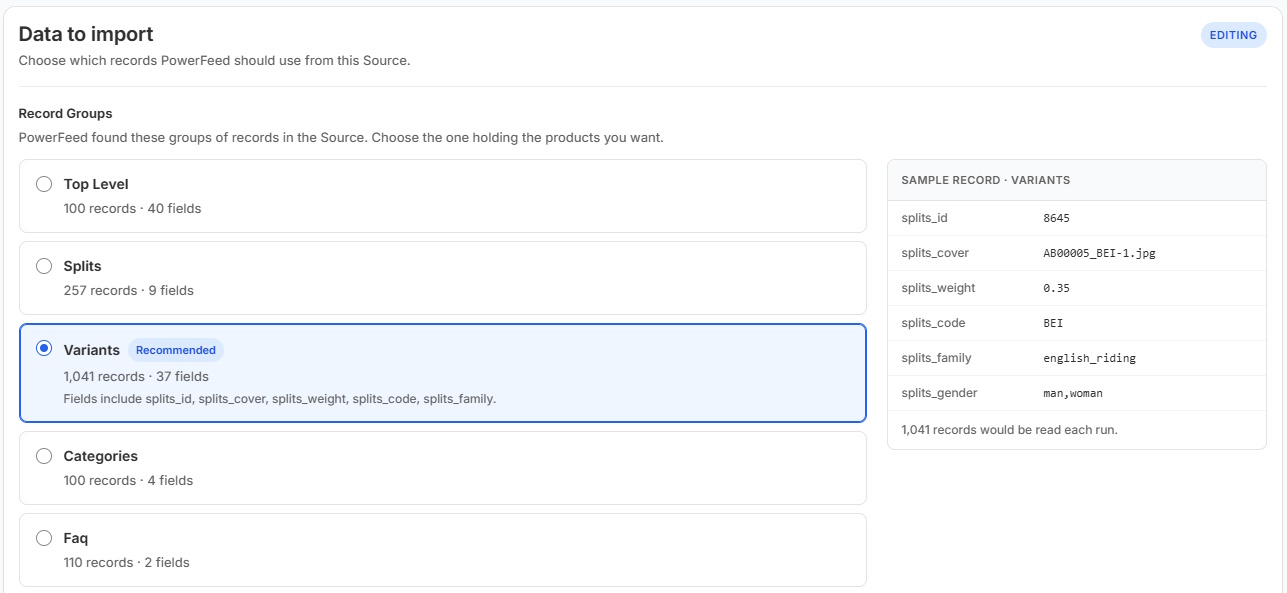
XML feeds can contain useful product and variant data in structures that don't match Shopify's CSV format. For compatible XML sources, PowerFeed can apply a configured mapping workflow so repeat updates aren't a manual conversion task. The structure needs checking before setup.
- Confirm how the XML records are structured
- Map and test the fields you intend to update
Practical guide
What to look for in an XML feed
- Find the repeating product node. A
<catalogue>may contain many<product>elements; determine which attributes belong to the parent product and which belong to variants. - Locate a reliable identifier. SKUs or stable external IDs are preferable to titles when matching updates; check duplicates and attribute changes.
- Handle nested structures deliberately. Images may appear as repeated elements and size/colour variations may be children of one product rather than separate root records.
- Check values and availability. Understand number formats, currencies, optional nodes, empty tags and whether the stock data is genuinely current.
- Test the mapped output. Use products with one variant, multiple variants and missing optional values before scheduling future imports.
Worked example
Why the XML structure matters
Illustrative sample · xml
<catalogue>
  <product code="BIKE-100">
    <name>Trail Glove</name>
    <brand>Example Brand</brand>
    <variants>
      <variant sku="BIKE-100-M" size="M" stock="8" />
      <variant sku="BIKE-100-L" size="L" stock="3" />
    </variants>
  </product>
</catalogue>
The parent name and brand belong to one Shopify product; the individual SKUs and stock amounts belong to variants. Treating every XML node as a separate Shopify product would lose that relationship.
Illustrative sample data
- product · BIKE-100
- Trail Glove
- Parent name and brand are shared.
- variant · Size M
- BIKE-100-M
- stock attribute: 8
- variant · Size L
- BIKE-100-L
- stock attribute: 3
What to watch for
XML-specific pitfalls
XML namespaces, attributes versus child elements, character encoding and optional nested nodes can affect parsing. An empty XML tag may have a different meaning from an absent node. File structure can also change when a supplier adds a new collection or alters its export. Test what the source actually contains rather than assuming every XML document follows the same convention.
Where PowerFeed fits
Recurring imports for compatible XML feeds
PowerFeed's supplier-source workflow is designed to take structured product data through mapping, controlled creation/updates and run reporting. For an XML supplier source, the precise parser and record structure must be reviewed during connection setup; not every document can be imported correctly without configuration. Once mapped and tested, repeat updates become much more manageable than manual conversions.
Questions about xml product imports
- Can I rename an XML file to CSV?
- No. XML and CSV have different structures; the XML must be parsed and mapped to the required product records.
- Can one XML product have multiple Shopify variants?
- Yes, when its nested size/colour/SKU records are interpreted and grouped correctly. Verify the mapping on a representative sample.
- Will XML updates automatically change all product fields?
- They should only affect the fields allowed by the configured update workflow. Test the contract and mappings before running across the whole catalogue.