
The short answer
How do JSON product feeds work with Shopify?
A JSON product feed typically contains an array of product records, with properties for identifiers, titles, brands, prices or quantities and sometimes nested variant or image arrays. To use it for Shopify catalogue updates, the import must identify the right records, map each property to the correct destination and decide how repeat runs match existing items. Unlike a one-time CSV upload, a recurring JSON feed may be worth configuring as an ongoing source.
POWERFEED IN PRACTICE
Configure recurring imports from compatible JSON feeds.
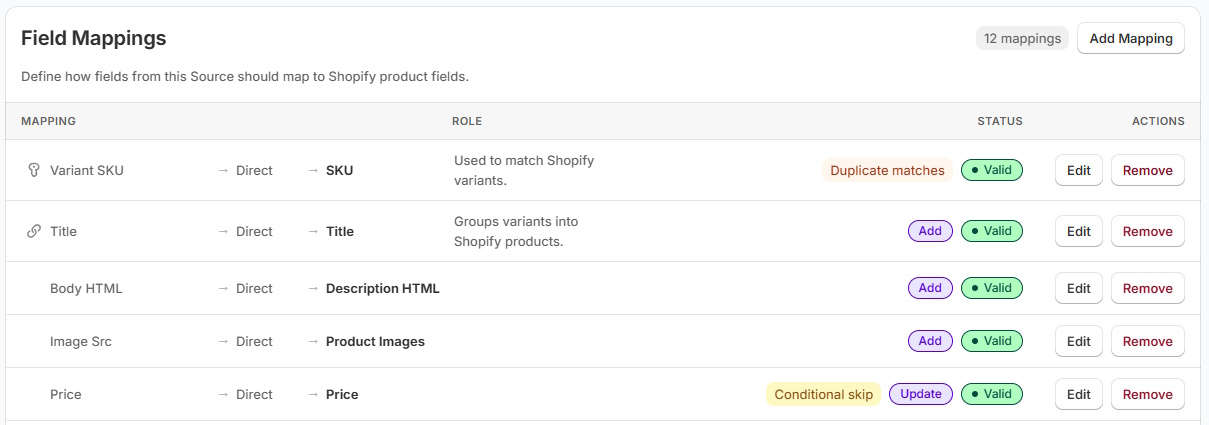
JSON feeds often contain nested products, variants and prices. When the source structure is compatible, PowerFeed can map the required fields into controlled Shopify updates and repeat the process as the data changes—without manually rebuilding a spreadsheet each time.
- Check record structure and identifiers
- Reuse mappings for subsequent runs
Practical guide
Check the data shape before you build the mapping
- Locate the product array. Find whether records sit under
products,items,dataor another key. A response envelope may include metadata that isn't part of a product. - Identify nested collections. Variants, attributes and image lists need intentional flattening/grouping rather than being treated as string values.
- Choose stable keys. Confirm the supplier SKU, item ID or barcode is suitable for matching products or variants through future imports.
- Validate types. Stock might be a number or string; prices could be minor currency units, decimals or formatted text.
null, empty string and absent property are not equivalent without explicit rules. - Run a representative test. Include missing fields, multi-variant products, multiple images and large or paginated datasets where applicable.
Worked example
Example JSON product and variant structure
Illustrative sample · json
{
  "products": [
    {
      "name": "Trail Glove",
      "brand": "Example Brand",
      "variants": [
        { "sku": "BIKE-100-M", "size": "M", "available": 8 },
        { "sku": "BIKE-100-L", "size": "L", "available": 3 }
      ]
    }
  ]
}
The products array identifies the collection; variants contains two SKUs belonging to one parent product. Confirm what available means before mapping it to Shopify stock. This sample is not a required PowerFeed format.
Illustrative sample data
- products[0].name
- Trail Glove
- One parent in the products array.
- variants[0].sku
- BIKE-100-M
- First variant in that parent's array.
- variants[0].available
- 8
- A number whose stock meaning needs confirmation.
What to watch for
JSON isn't always a simple flat list
An API may return pages of JSON rather than one complete file; that is a connection and pagination issue, not merely a JSON parsing issue. Suppliers can also vary their structure between catalogue and stock endpoints. Check whether the JSON is a static hosted file, a downloadable feed or a live API response, and configure the source appropriately.
Where PowerFeed fits
Import JSON data using saved mappings
PowerFeed's source, mapping and contract approach is useful when JSON records need to be shaped into Shopify products and variants and reused over successive imports. Review the actual feed and connection method during setup. A properly configured source can help avoid repeated manual conversion and give visibility into how a run handled incoming records.
Questions about json product imports
- Does Shopify natively import arbitrary JSON product files?
- Shopify's standard product upload workflow is CSV-based. A custom integration or compatible app is required to map a supplier's arbitrary JSON structure.
- Can JSON contain product variants?
- Yes. Variants are often arrays nested under each product; the import must maintain their association with the correct parent product.
- Is a JSON file the same as an API connection?
- No. JSON is a data format. An API is a way to request data and may require authentication, pagination and multiple endpoints.