
The short answer
What is a Shopify supplier product feed?
A supplier product feed is a repeatable source of catalogue information: a spreadsheet, a hosted CSV/XML/JSON file, a file on FTP/SFTP, or an API response. It may contain product details, variants, prices, availability and image references. Connecting that feed to Shopify lets a merchant reduce manual updates. The important work is deciding how records match, which fields can change, how often to run and what happens when the supplier sends incomplete or unexpected data.
POWERFEED IN PRACTICE
Automate routine product and stock updates.
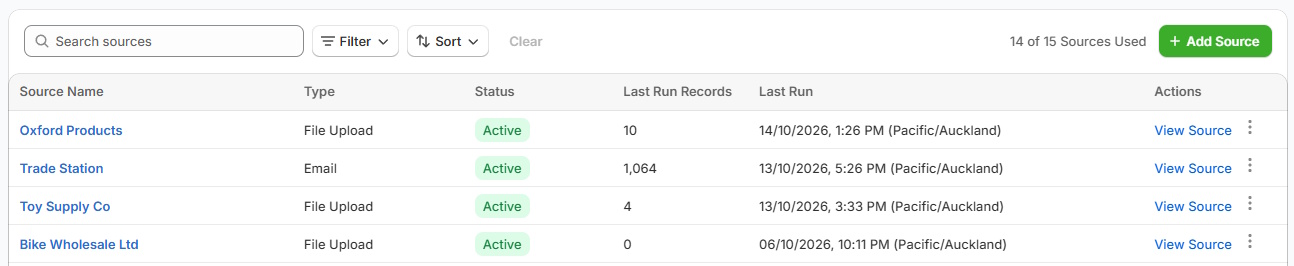
Stock, prices and product details can change while you're busy running your store. PowerFeed lets you configure a repeatable process for each supplier feed, with mappings, scheduled runs and a clear record of what happened.
- Connect supported supplier files and data sources
- Schedule updates within your plan's limits
Practical guide
How to set up a supplier feed that you can trust
- Find the actual source. Ask the supplier for a sample feed, its available delivery method, expected refresh frequency and whether stock/pricing have separate endpoints or files.
- Understand what each row means. Identify stable SKUs, variant relationships, duplicate items, images and whether stock values represent sellable supplier availability.
- Choose a controlled update scope. Decide whether the source adds new products, updates existing ones or only changes inventory/pricing. Keep curated content out of scope if the supplier shouldn't replace it.
- Validate the first run. Test a subset, inspect matching, unexpected zeros, fields that are missing and the difference between a newly discontinued product and a temporary feed error.
- Schedule and monitor. Choose a frequency that reflects the supplier's refresh schedule, the business risk and your plan limits. Review run results and investigate failed or incomplete imports.
Worked example
One supplier can have different update jobs
| Data received | Typical change | Sensible consideration |
|---|---|---|
| Full product catalogue | Names, variants, descriptions, imagery | Less frequent, carefully controlled product updates |
| Stock availability | Quantities/availability | More frequent runs when the supplier refreshes often |
| Pricing file | Supplier cost or selling price | Validate currency, rules and missing values |
A supplier may offer one combined feed or several specialised feeds. Choose the architecture around the data actually supplied.
What to watch for
Why supplier feed automation sometimes goes wrong
- An upload is not a synchronisation strategy. A file may arrive every day, yet contain stale or incomplete information.
- A wrong match is more dangerous than a skipped match. Product and variant identifiers deserve deliberate testing.
- A source shouldn't control every field by default. Separate the information the supplier owns from the copy, tags or merchandising that the merchant owns.
Where PowerFeed fits
A repeatable workflow, with the rules visible
PowerFeed lets you configure each supplier source with field mappings, supported transformations, a data contract and update safeguards. You can reuse that configuration, schedule updates within your plan and inspect run histories for errors or skipped records. Different suppliers often require different mappings and connection methods. For non-standard feeds, our New Zealand team can assist with setup.
Questions about supplier feed automation
- Does a supplier need to provide a Shopify-specific feed?
- Not necessarily. Structured supplier data can often be mapped into Shopify even when its source columns are different. Compatibility and setup depend on the feed.
- Does a feed update in real time?
- Not automatically. Freshness depends on when the supplier publishes new data, how the connection is configured and the scheduled run frequency.
- What if my supplier doesn't provide a feed?
- Ask them whether they can provide regular files or an API. You can also recommend the supplier to PowerFeed for review; it doesn't guarantee immediate integration.