
The short answer
Can Shopify import products from FTP or SFTP?
Shopify's standard admin CSV import is a manual upload workflow. When a supplier publishes a CSV, spreadsheet, XML or other supported structured file to an FTP/SFTP location, a suitable integration can retrieve the file, map it and update Shopify on a schedule. The connection needs a known host, file path, appropriate credentials and a clear understanding of what the file contains. FTP and SFTP are different protocols; favour SFTP when available for encrypted file transfer.
POWERFEED IN PRACTICE
Stop manually fetching supplier files.
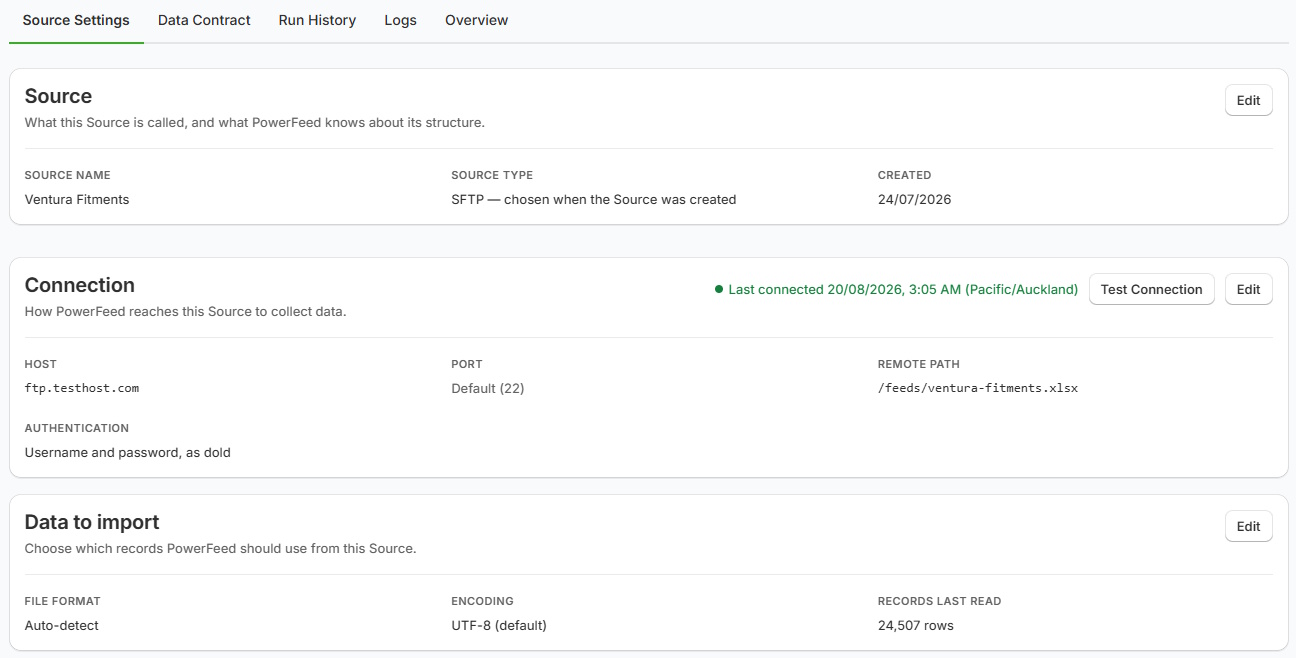
If your supplier publishes files over FTP or SFTP, PowerFeed can use a configured connection to collect supported data and apply your saved product mappings. That means less downloading, reformatting and uploading whenever a new file arrives.
- Work with supplier-managed file locations
- Review each import's outcome
Practical guide
What you'll need from your supplier
- Connection details. Request the server host, protocol, port where relevant, username, authentication method and file path. Handle credentials securely and never paste real credentials into public documentation.
- Delivery expectations. Ask when files are uploaded and whether filenames change, files are overwritten, and old versions remain available.
- A sample file. Determine the format, encoding, column structure, variant model and whether stock/prices are in the same file as product details.
- Matching and field rules. Configure reliable identifiers and permitted updates before scheduling the connection.
- A tested run. Confirm the file can be read, rows parse as expected, and catalogue changes are limited to what you intend.
Worked example
The path from supplier server to Shopify
| Supplier situation | What to decide |
|---|---|
Daily /exports/products.csv | Run after the supplier publishes the file |
Separate /stock.csv and /prices.csv | Consider independent update jobs and controls |
| Filename changes every day | Confirm supported retrieval/file-selection behaviour during setup |
| Supplier wants you to host a drop-off location | Review optional Managed SFTP Space rather than assuming you need it for every connection |
FTP/SFTP describes the file transport, not its contents. Confirm source-specific file compatibility and retrieval behaviour before scheduling.
Illustrative sample data
- 01 · Retrieve
- /exports/products.csv
- Supplier SFTP folder; confirm the completed file.
- 02 · Parse and map
- SKU · Price · Stock
- Validate the source and permitted fields.
- 03 · Apply
- Shopify updates
- Match products and variants; review the run.
What to watch for
FTP and SFTP issues to check
A successful login does not prove the correct file was retrieved. Check filenames, timestamps and whether uploads were complete. Credentials and network access may change, so review connection failures and run logs. An empty file must not be interpreted as zero stock without explicit rules. Test how your configured source handles missing files, blank values and errors.
Where PowerFeed fits
From remote file to repeatable product import
PowerFeed supports supplier files delivered by FTP/SFTP, with source configuration, mappings, controlled updates, scheduled runs within the plan and run histories. Merchants using a supplier's existing server don't automatically need PowerFeed's separately priced Managed SFTP Space. If a supplier instead needs somewhere to upload files, that optional hosted service may be relevant; see Pricing for the current terms.
Questions about ftp and sftp imports
- Is SFTP the same as FTP?
- No. SFTP uses an encrypted transfer mechanism; traditional FTP does not inherently provide the same protection. Confirm which protocol your supplier supports.
- Do I need to download the file first?
- Not for a correctly configured automated remote-file source. The integration can retrieve it for processing; confirm connection details and file compatibility.
- Does Managed SFTP Space come with every plan?
- It is an optional paid add-on, separate from connecting to a supplier's existing FTP/SFTP server.